

Mitsubishi CN105 Climate
The mitsubishi_cn105 component allows communication with Mitsubishi Electric indoor units using the CN105 connector.
The component communicates with the unit over UART and provides control and state reporting.
Hardware Connection
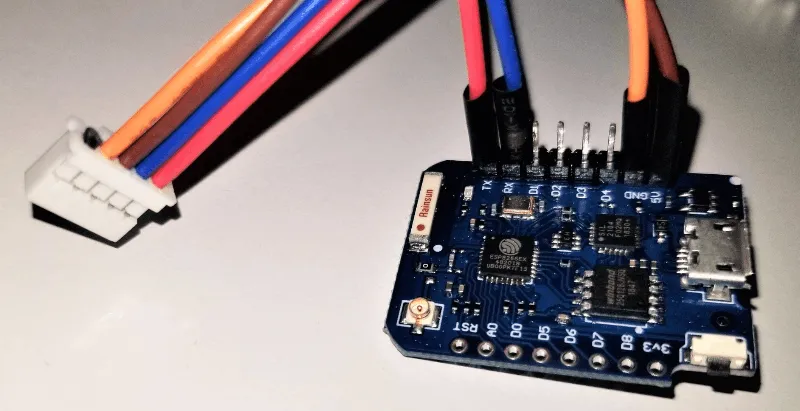
Section titled “Hardware Connection”The CN105 connector exposes power and UART communication lines.
CN105 pinout
Section titled “CN105 pinout”| Pin | Function | Wire color | Device |
|---|---|---|---|
| 1 | NC | ||
| 2 | GND | orange | GND |
| 3 | 5V | brown | 5V |
| 4 | TX | blue | RX |
| 5 | RX | red | TX |
WARNING
Verify the pinout and voltage levels before connecting.
This component requires a UART bus configured with:
- 8 data bits
- EVEN parity
- 1 stop bit
- Baud rate
2400or9600
NOTE
The required baud rate depends on the indoor unit. During initial setup, try both supported values if communication does not work.
Example configuration
Section titled “Example configuration”uart: id: ac_uart tx_pin: GPIO1 rx_pin: GPIO3 data_bits: 8 baud_rate: 2400 parity: EVEN stop_bits: 1
mitsubishi_cn105: id: hp uart_id: ac_uart
climate: - platform: mitsubishi_cn105 mitsubishi_cn105_id: hp name: "Living Room AC" supported_swing_modes: BOTHWARNING
If you are using the Logger Component, make sure you are not using the same pins, or disable UART logging with:
logger: baud_rate: 0Supported features
Section titled “Supported features”- Target temperature range:
16 °Cto31 °C, or61 °Fto88 °Fwithuse_fahrenheitenabled - Current temperature reporting
- Modes:
OFF,HEAT,COOL,DRY,FAN_ONLY,HEAT_COOL(calledAUTOby Mitsubishi) - Fan modes:
AUTO,QUIET,LOW,MEDIUM,MIDDLE,HIGH - Swing modes:
OFF,VERTICAL,HORIZONTAL,BOTH(configurable viasupported_swing_modes) - Vertical vane direction select
NOTE
Fan modes map to the following Mitsubishi fan speeds:
AUTO→AUTOQUIET→QUIETLOW→SPEED 1MEDIUM→SPEED 2MIDDLE→SPEED 3HIGH→SPEED 4
Configuration variables
Section titled “Configuration variables”Mitsubishi CN105
Section titled “Mitsubishi CN105”-
id (Optional, ID): Manually specify the ID of this Mitsubishi CN105 hub. Use this ID to reference the hub from climate entities and actions.
-
uart_id (Optional, ID): The UART bus to use.
-
update_interval (Optional, Time): Interval between status updates. Defaults to
1s. Lower values provide faster detection of external changes, for example when using the remote control. -
telemetry_request_min_interval (Optional, Time): Minimum time between consecutive telemetry reads. Defaults to
60s.This allows keeping a low
update_interval(to quickly reflect changes, e.g. when using an IR remote) while avoiding excessive telemetry requests (for example room temperature reads).Telemetry is still requested during regular polling cycles, so the effective update frequency is bounded by
update_interval.Set to
neverto disable telemetry polling. -
use_fahrenheit (Optional, boolean): Configure the climate entity to report and accept temperatures in Fahrenheit using Mitsubishi-specific mapping. Defaults to
false.NOTE
Some indoor units use a temperature encoding that cannot accurately represent Fahrenheit setpoints. If the component reports an encoding error and fails to initialize, disable
use_fahrenheit. -
vane (Optional): Vane state automation configuration.
- on_state (Optional, Automation): An automation to run whenever the hub publishes its current
state. The automation receives the current vane state as
x. Seevane.on_stateTrigger for the available values and an example.
- on_state (Optional, Automation): An automation to run whenever the hub publishes its current
state. The automation receives the current vane state as
Climate
Section titled “Climate”-
mitsubishi_cn105_id (Optional, ID): The Mitsubishi CN105 hub to use.
-
supported_swing_modes (Optional, enum): Selects which swing modes are exposed by the climate entity. Defaults to
'OFF'.'OFF'— no swing supportVERTICAL— exposes'OFF',VERTICALHORIZONTAL— exposes'OFF',HORIZONTALBOTH— exposes'OFF',VERTICAL,HORIZONTAL,BOTH
-
All other options from Climate.
Select
Section titled “Select”Vane controls are optional and can be enabled independently of the climate entity’s supported_swing_modes. They
expose Mitsubishi-specific vane options that are available on the indoor unit but are not represented by Home
Assistant’s generic climate model. Vane controls require a top-level mitsubishi_cn105: hub; see
Migration From Climate-Owned Configuration if your configuration still
defines the hub options on the climate: entry.
-
mitsubishi_cn105_id (Optional, ID): The Mitsubishi CN105 hub to use.
-
vertical_vane_direction (Optional, Select): Exposes the vertical vane direction as a select entity.
Available options are:
Auto,1,2,3,4,5,Swing.These are the select option labels exposed to Home Assistant. If referenced from automations or templates, use them exactly as shown, including casing.
All options from Select are supported.
Example:
mitsubishi_cn105:id: hp# ...select:- platform: mitsubishi_cn105mitsubishi_cn105_id: hpvertical_vane_direction:name: "Vertical Vane"
vane.on_state Trigger
Section titled “vane.on_state Trigger”The vane.on_state trigger runs whenever the Mitsubishi CN105 hub publishes a vane state. This includes updates
received from the indoor unit and changes requested through ESPHome. It is a snapshot trigger, not a change-only
trigger, so it can run repeatedly when the vane direction has not changed.
The trigger passes a VaneState value named x to lambdas. The current vertical vane direction is available as
x.vertical.direction and can have one of these values:
VERTICAL_VANE_MODE_AUTOVERTICAL_VANE_MODE_POSITION_1VERTICAL_VANE_MODE_POSITION_2VERTICAL_VANE_MODE_POSITION_3VERTICAL_VANE_MODE_POSITION_4VERTICAL_VANE_MODE_POSITION_5VERTICAL_VANE_MODE_SWINGVERTICAL_VANE_MODE_UNKNOWN
mitsubishi_cn105: id: hp # ... vane: on_state: - lambda: |- switch (x.vertical.direction) { case VERTICAL_VANE_MODE_AUTO: ESP_LOGI("vane", "Vertical vane is automatic"); break; case VERTICAL_VANE_MODE_SWING: ESP_LOGI("vane", "Vertical vane is swinging"); break; case VERTICAL_VANE_MODE_UNKNOWN: ESP_LOGW("vane", "Vertical vane direction is unknown"); break; default: ESP_LOGI("vane", "Vertical vane is in a fixed position"); break; }mitsubishi_cn105.vane.control Action
Section titled “mitsubishi_cn105.vane.control Action”The mitsubishi_cn105.vane.control action changes the vane direction. Its id must reference the top-level
Mitsubishi CN105 hub. The currently supported setting is vertical.direction, which accepts AUTO, 1, 2, 3,
4, 5, or SWING. It can also be a lambda returning one of the corresponding
VERTICAL_VANE_MODE_* values. A lambda returning VERTICAL_VANE_MODE_UNKNOWN is ignored and does not change the
vane direction.
on_...: - mitsubishi_cn105.vane.control: id: hp vertical: direction: SWINGConfiguration variables:
- id (Required, ID): The ID of the top-level
mitsubishi_cn105hub. - vertical (Optional): Vertical vane settings.
- direction (Optional, string, templatable): One of
AUTO,1,2,3,4,5, orSWING.
- direction (Optional, string, templatable): One of
Custom Vertical Vane Select
Section titled “Custom Vertical Vane Select”This example maps a template select to the indoor unit’s vertical vane positions. Add a vane.on_state automation,
as shown above, if the select should also reflect changes made using the unit’s remote control.
mitsubishi_cn105:  id: hp  # ...
select:  - platform: template    id: custom_vertical_vane    name: "Custom Vertical Vane"    optimistic: true    options:      - "↑↑"      - "↑"      - "—"      - "↓"      - "↓↓"      - "Swing"      - "Auto"    set_action:      - mitsubishi_cn105.vane.control:          id: hp          vertical:            direction: !lambda |-              if (x == "↑↑") return VERTICAL_VANE_MODE_POSITION_1;              if (x == "↑") return VERTICAL_VANE_MODE_POSITION_2;              if (x == "—") return VERTICAL_VANE_MODE_POSITION_3;              if (x == "↓") return VERTICAL_VANE_MODE_POSITION_4;              if (x == "↓↓") return VERTICAL_VANE_MODE_POSITION_5;              if (x == "Swing") return VERTICAL_VANE_MODE_SWING;              return VERTICAL_VANE_MODE_AUTO;
Remote temperature actions
Section titled “Remote temperature actions”-
mitsubishi_cn105.set_remote_temperature
- Sends an external (remote) room temperature to the indoor unit.
- Overrides the unit’s internal temperature sensor.
- The temperature is always interpreted as Celsius, regardless of
use_fahrenheit. - Supported temperature range:
8.0–39.5 °C.
-
mitsubishi_cn105.clear_remote_temperature
- Clears the externally provided temperature.
- Restores use of the unit’s internal temperature sensor.
Example:
mitsubishi_cn105:  id: hp  # ...
sensor:  - platform: homeassistant    id: living_room_temp    entity_id: sensor.living_room_temperature    on_value:      then:        - mitsubishi_cn105.set_remote_temperature:            id: hp            temperature: !lambda 'return x;'
NOTE
This does not modify the temperature reported by the A/C unit in its status/room temperature packets. The reported current temperature remains the value provided by the unit itself. Some units may reflect the externally provided temperature, while others may continue to report their internal sensor value.
Some units may automatically fall back to the internal sensor if no external temperature is sent. In such cases,
the external temperature should be sent periodically (for example using an interval). Alternatively,
mitsubishi_cn105.clear_remote_temperature can be called if the external sensor becomes unavailable
for an extended period.
It is the user’s responsibility to tailor the update strategy and usage to their specific A/C unit and setup.
This is an advanced feature; users are expected to understand the implications of overriding the internal sensor. Depending
on the unit, it may be necessary to explicitly call mitsubishi_cn105.clear_remote_temperature to restore normal
operation. Improper use may lead to unexpected behavior.
Migration From Climate-Owned Configuration
Section titled “Migration From Climate-Owned Configuration”Older configurations that define Mitsubishi CN105 UART/protocol options inside the climate: entry
(platform: mitsubishi_cn105) are still accepted temporarily when no top-level mitsubishi_cn105 hub is configured,
but they emit a deprecation warning at compile time. All Mitsubishi CN105 climate entries must be migrated together;
once a top-level hub is configured, legacy hub options in any climate entry are rejected.
- Move
uart_idandupdate_intervalfrom the Mitsubishi CN105 climate entry to top-levelmitsubishi_cn105. - Replace
current_temperature_min_interval(in the climate entry) with top-leveltelemetry_request_min_interval. - Replace
climate.mitsubishi_cn105.set_remote_temperatureandclimate.mitsubishi_cn105.clear_remote_temperaturewithmitsubishi_cn105.set_remote_temperatureandmitsubishi_cn105.clear_remote_temperature.
Legacy climate-owned configuration compatibility will be removed in ESPHome 2027.2.0.